
Instead of manually matching peptide labels to scattered files, build a peptide batch number quality control log that connects each supplier batch to its receipt records, evidence, and review decision. For materials purchased from Southwestaminos, preserve the supplier’s batch identifier exactly and give each receipt its own internal identifier.
- For Southwestaminos research buyers, a peptide batch number quality control log supports batch-level traceability, not proof of quality.
- Store supplier batch numbers as text; preserve leading zeros, punctuation, and letter case.
- Separate batch identity, individual receipts, and QC events instead of overwriting a single row.
- Keep unresolved identity or document mismatches on hold until an authorized reviewer records a decision.
Why this matters
A batch number identifies material; it does not establish identity, purity, or suitability for a laboratory protocol. Your log must connect that identifier to the evidence reviewed and the person responsible for the decision.
For Southwestaminos research buyers, batch-level logging is best for tracing laboratory materials from receipt to documented review. The workflow applies to research materials such as Retatrutide and Tirzepatide without implying human use or approved use.
For a 2026 log, separate what the supplier states from what your laboratory verifies. A supplier document, an internal analytical result, and a reviewer’s conclusion belong in distinct fields. That separation prevents an attached certificate from being mistaken for completed laboratory QC.
Before you start
- Gather the source records: the container label, purchasing reference, receiving record, and any batch-specific documents supplied. Record missing evidence as missing; do not reconstruct identifiers from memory.
- Confirm access: you need permission to create records, attach controlled documents, and assign review responsibility in your spreadsheet, database, or laboratory information management system, or LIMS.
- Prevent identifier conversion: configure batch fields as text before importing anything. Spreadsheet conversion can remove leading zeros or interpret an identifier as a date, breaking the connection before review begins.
The bold field names below are labels to create in your own template, not claims about a particular application’s interface. Use your system’s documented controls to implement them.
Batch identity configuration
Start with a batch register that holds supplier identity separately from laboratory handling history. Do not use a purchase-order number as the batch identifier: a purchasing reference identifies a transaction, not necessarily a single material batch.
- Create Supplier, Material name, Supplier batch number, and Internal batch ID as 4 required identity fields. Copy the material name and supplier batch directly from the source label.
- Set Supplier batch number to text. Preserve the original string even if you also create a separate normalized search field.
- Assign an Internal batch ID through your laboratory’s existing identifier procedure. Use this stable internal identifier to connect records across the log.
- Check for an existing batch using supplier, material, and supplier batch together. Treat a match as a candidate for review, not permission to merge automatically.
- Add Identity discrepancy and Discrepancy notes. Record conflicting label and document identifiers without replacing either source value.
Expected result: searching the internal identifier returns the supplier, material, original batch number, and any unresolved identity discrepancy. A second receipt of the same confirmed batch does not create an unrelated batch record.
For a 2026 template, include Template version in the log’s configuration record. That identifies the field structure used when the record was created; it is separate from the date the material arrived.
Receipt and document configuration
A batch record describes the supplier batch. A receipt record describes a particular arrival at your laboratory. Keeping these separate lets you retain different receiving observations for material carrying the same batch identifier.
- Create Receipt ID, Internal batch ID, Received date, Received by, and Container ID. Use a separate receipt record for each arrival and distinct container identifiers where your procedure requires container-level tracking.
- Record Receiving observations from the actual inspection. Describe visible label condition, discrepancies, and other observations required by your approved receiving procedure; do not infer transport conditions from appearance.
- Create Document ID, Document type, Document version, Document batch number, and Document location in a linked document register.
- Compare Document batch number with the original container identifier. Record Batch match as confirmed, unresolved, or not applicable, with an explanation where needed.
- Preserve the original file in your controlled repository. Store its reference in Document location rather than scattering independent copies across email and local folders.
Expected result: opening a receipt shows its source batch, container references, receiving observations, and supporting documents. A reviewer can find the original evidence without asking the buyer to resend an attachment.
For a 2026 document import, retain the document’s stated issue date separately from the upload timestamp. Uploading a file today does not change when its underlying analysis occurred.
A missing document is a gap to resolve, not a blank cell to ignore. Record Evidence status and assign an owner so the next reviewer can distinguish an outstanding request from a completed check.
QC event and review configuration
Use a separate event register for checks and decisions. Overwriting a single result cell erases the distinction between an initial observation, a repeat check, and the final disposition.
- Create QC event ID, Internal batch ID, Receipt ID, Check type, Method reference, Evidence reference, Performed by, and Performed date. Connect every event to the material actually evaluated.
- Add Acceptance criteria reference and Observed result as separate fields. Reference the laboratory-approved method or protocol; do not invent a universal peptide acceptance threshold.
- Add Review decision, Reviewed by, Reviewed date, and Decision rationale. Limit disposition changes to authorized reviewers through the permissions your system supports.
- Define 3 workflow states: Hold, Accepted for defined research, and Rejected. Start incoming records on Hold and document the conditions for each later transition in your laboratory procedure.
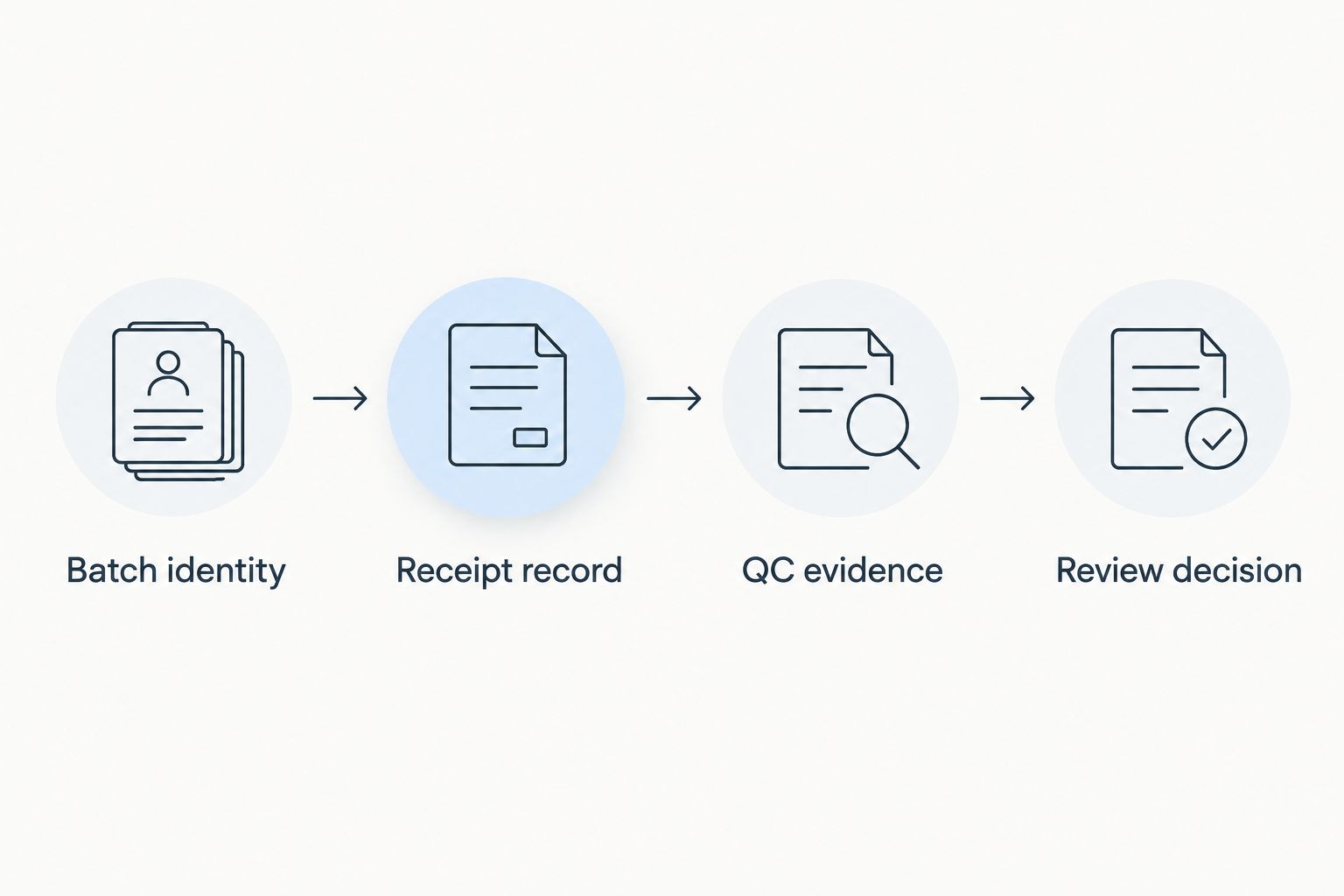
- Test the record chain before routine use: Batch identity, Receipt record, QC evidence, and Review decision. Confirm that each record opens the correct linked evidence.
Expected result: the log shows what was checked, which evidence supports the result, and who authorized the disposition. Acceptance applies only to the documented research scope; it is not a medical or regulatory approval.
A 2026 review record should preserve the criteria used at the time of the decision. If your laboratory later revises a method, keep the earlier reference with the earlier event rather than silently changing its meaning.
Log platform and connection configuration
Choose the platform around the controls your laboratory needs. A spreadsheet and a LIMS can both hold identifiers, but neither fixes an unclear record structure.
| Option | Best for | Advantage | Limitation |
|---|---|---|---|
| Controlled spreadsheet | A clearly owned log with a simple review process | Makes fields and linked registers easy to inspect | Requires deliberate access control, change tracking, and checks for broken references |
| Configured LIMS | Connecting receiving, QC events, and laboratory records | Can enforce relationships and permissions when configured to do so | Requires field mapping, validation, and maintenance of the configuration |
- Map each source field to its destination field before importing. Document how blank values, duplicate identifiers, and conflicting records are handled.
- Require Internal batch ID on linked records. Reject or hold imports that reference an identifier absent from the batch register.
- Route new receipts and unresolved evidence to Hold. Do not configure a document upload to mark a batch accepted automatically.
- Test a complete record, a missing-document record, and a conflicting-batch record. Confirm that each follows the intended review path.
- Assign a log owner and a reviewer for configuration changes. Record changes to field definitions and disposition rules.
Expected result: new records either connect to a confirmed batch or enter an exception queue. They do not disappear into an unmatched spreadsheet tab.
For system mapping beyond the log, use the research peptide inventory-to-LIMS guide. Preserve the same internal batch identifier across both workflows rather than creating competing identifiers for the same material.
Add QC events whenever evidence changes
The adjacent workflow is an update process rather than a receiving process. Use it when a revised supplier document arrives, an internal check produces new evidence, or a reviewer corrects a previous entry.
- Locate the existing batch and receipt using their internal identifiers.
- Create a new QC event ID or document version. Keep the earlier record available under your retention procedure.
- Record Change reason, Previous evidence reference, and the new evidence reference.
- Route the change for review. If it affects an earlier acceptance decision, apply your laboratory’s documented reassessment procedure.
- Record the new decision and identify which linked research records require notification or review.
Expected result: the history explains both the original decision and the later change. The current disposition is visible without deleting the evidence behind earlier work.
For Southwestaminos research materials, keep supplier evidence distinct from laboratory-generated evidence throughout this update process. A newly received file is an event requiring evaluation, not an instruction to overwrite an internal result.
Troubleshooting
Batch numbers lose leading zeros
Set the destination field to text, then reimport from the original source. Do not repair a damaged identifier by guessing how many characters were removed. Compare the corrected value with the container label before reconnecting records.
The label and document show different batches
Keep the receipt on Hold and retain both identifiers. Request clarification through your laboratory’s purchasing or quality process. Do not rename the document or alter the label transcription to manufacture a match.
Several receipts appear under duplicate batch records
Compare supplier, material, and original batch identifier before consolidating anything. Where the records represent the same confirmed batch, preserve separate receipt histories and document the consolidation. Keep genuinely different batches separate even when their material names match.
An attachment opens, but its relevance is unclear
Add the missing batch, receipt, document-version, and check references. An accessible PDF is not sufficient evidence unless the reviewer can connect it to the material and decision under review.
A shared file changes without a review trail
Restrict editing through the controls your platform supports and use your laboratory’s approved change-recording procedure. If the file cannot preserve the required history, change the workflow or platform rather than treating file access as an audit trail.
Customize your workflow
Extend the log only after its identity and review links work. Add project references, instrument-result references, or internal sample identifiers when they answer a defined laboratory question.
For a 2026 configuration review, ask someone other than the record creator to retrieve a batch’s receipt, evidence, and decision. Record missing links as workflow defects and resolve them before expanding the template.
Make the next improvement traceability, not extra columns. A field without an owner, definition, or review purpose adds maintenance without clarifying a decision.
FAQ
How do I connect a peptide batch number to a quality control log?
Preserve the supplier batch number as text and assign a stable internal batch ID. Link receipts, documents, QC events, and review decisions through that internal identifier.
Is a peptide batch number the same as a purchase-order number?
No. A batch number identifies a supplier batch, while a purchase-order number identifies a purchasing transaction. Keep both fields separate and connect them through the receipt record.
Can I use a spreadsheet instead of a LIMS for peptide batch tracking?
A spreadsheet can hold a peptide batch log if your laboratory establishes suitable access, review, and change-recording controls. A LIMS also requires configuration and validation; its presence alone does not establish traceability.
Does attaching a certificate of analysis complete laboratory QC?
No. An attachment records evidence, not a completed review decision. Confirm its connection to the batch and evaluate it against the laboratory’s defined research requirements.
What should I do when a peptide label and certificate show different batch numbers?
Keep the affected receipt on hold and preserve both source identifiers. Obtain clarification through your laboratory’s quality process before an authorized reviewer changes the disposition.
How should I log another shipment from the same peptide batch?
Create a separate receipt record linked to the confirmed existing batch. Preserve that arrival’s container references, receiving observations, and supporting evidence.
Should Retatrutide and Tirzepatide share one QC record?
Keep material and batch identities separate for Retatrutide and Tirzepatide. Connect each laboratory check to the specific batch and receipt evaluated, even when both materials belong to the same research project.
One last thing
Test traceability backward. Start with a research record and ask whether a reviewer can identify the exact receipt, supplier batch, supporting evidence, and disposition without relying on anyone’s memory. That test exposes missing connections that a neatly formatted log can hide.