
Instead of manually reconciling certificates of analysis with notebook entries, use a peptide COA verification workflow that connects each received lot to its analytical evidence and review decision. This 2026 guide shows you how to build that record for laboratory research without treating a purity figure as proof of identity or suitability.
- For Southwestaminos peptide research purchases, verify lot documentation before accepting a certificate as notebook evidence.
- A peptide coa verification workflow connects the received lot, analytical evidence, reviewer decision, and research notebook.
- Chromatographic purity, peptide identity, and peptide content answer different questions; review each against your research requirements.
- Preserve superseded certificates and reassess affected records whenever lot documentation changes.
Why this matters
A certificate of analysis, or COA, documents reported testing. It does not automatically establish that the document belongs to the material you received, that its methods answer your research question, or that your laboratory has accepted the lot.
For Southwestaminos peptide research purchases, lot-level traceability matters more than a standalone purity percentage. Apply that rule whether you source material through Southwestaminos or another supplier. This workflow does not assert that any particular supplier provides specific tests or documents.
Keep 3 checks separate: document-to-lot matching, analytical evidence review, and laboratory acceptance. Combining them into a single checkbox hides unresolved questions.
Use this 2026 workflow only for laboratory-research documentation. A completed record does not establish suitability for human use or any medical purpose.
Before you start
- Gather the evidence: Obtain the received-container label, purchase reference, available lot-specific COA, and supporting analytical files. Record requested documents as pending rather than assuming they exist.
- Arrange access and responsibility: You need permission to create notebook records, retain source files, and route the acceptance decision to the person authorized by your laboratory's procedures.
- Check the non-obvious mismatch: A product-page certificate or similarly named peptide is not automatically evidence for your received lot. Resolve missing or conflicting lot identifiers before recording the material as accepted.
Define your acceptance criteria before reviewing results. Otherwise, a favorable-looking certificate can become the standard against which you judge itself.
The bold field names below are suggested notebook-template labels, not buttons in a named software platform. Create equivalent fields in your existing notebook or records system; follow its actual interface and your laboratory's document-control rules.
Lot record configuration
Create the material-to-document connection
- Create Material record ID as the internal reference connecting receiving, documentation, and research records. Use 1 primary record per received lot, with separate container references when needed.
- Transcribe Peptide name, Supplier, and Received lot ID from the received material. Preserve spelling, punctuation, and identifiers rather than silently normalizing discrepancies.
- Add Purchase reference, Receipt date, and Container reference. Keep receipt dates separate from dates printed on analytical reports.
- Attach the certificate under Original COA. Retain its original filename and record the source from which you obtained it.
- Enter COA lot ID, Report identifier, Report date, and Document version when provided. Mark absent information explicitly; never manufacture a version number.
- Set Document match to a controlled value such as Matched, Unresolved, or Mismatched. Explain the evidence behind that selection in Match notes.
Expected result: A reviewer can move from the physical container to its lot record and then to the exact certificate without guessing which document applies.
For a 2026 notebook template, include the year in the template's revision history, not as a replacement for actual receipt or report dates. Historical dates on source documents must remain unchanged.
Record discrepancies without erasing them
If a supplier uses different identifiers on the container and certificate, record both. Request a documented connection between them rather than editing one identifier to resemble the other.
An internal sample reference can connect laboratory activity to a received lot, but it cannot repair missing supplier traceability. Hold the acceptance decision when the lot-to-document connection remains unresolved.
Analytical evidence configuration
Separate the questions each test answers
- Write the laboratory's required evidence in Acceptance criteria before entering the reported results. Include the applicable method, decision rule, and source of that requirement.
- Enter the certificate's reported purity result in Chromatographic result, including its unit or basis and the named method. Do not convert peak-area percentage into peptide mass content.
- Capture identity evidence under Identity evidence. Record the reported technique, result, and supporting file reference; a purity chromatogram alone does not establish molecular identity.
- Record content-related evidence under Content evidence when your research requires it. Distinguish peptide content from gross material mass and chromatographic purity.
- Capture other study-required attributes in Additional requirements. Examples include counterion information or specific contamination testing when the protocol requires them; a purity result does not answer those questions.
- Assign Evidence status to each requirement: Supported, Pending, or Not assessed. Explain any unsupported conclusion before routing the record for review.
Expected result: Every acceptance criterion points to identifiable evidence, and every evidence gap remains visible.
A reported result is interpretable only within its method and reporting basis. Mass-spectrometric evidence can support identity, but the interpretation depends on what was measured and how the result was assessed. Do not write a broader conclusion than the report supports.
Compare documentation approaches
These are recordkeeping options, not interchangeable levels of analytical assurance. Choose the approach your laboratory requires and keep its limitations visible.
| Approach | Best for | Advantage | Limitation |
|---|---|---|---|
| COA attachment only | Initial document collection | Preserves the supplied report | Does not establish a lot match or acceptance decision |
| Lot-linked evidence record | Traceable material review | Connects the container, certificate, and analytical files | Still requires scientific assessment against defined criteria |
| Reviewed acceptance record | Documenting a laboratory decision | Captures criteria, evidence, reviewer, and disposition | Remains limited by the quality and scope of available evidence |
Use a reviewed acceptance record when documenting a release decision. A detailed notebook cannot compensate for an uninformative method, an unresolved identifier, or missing required evidence.
Review and notebook configuration
Build the acceptance checkpoint
- Add Reviewer, Review date, and Review comments. Keep the person entering the data distinguishable from the person authorizing the decision when your procedures require separate roles.
- Add Disposition with explicit choices such as Pending review, Accepted for defined research, or Not accepted. Avoid a generic Verified label that conceals what was checked.
- Link each disposition to Acceptance criteria and the supporting document references. Explain exclusions, unresolved items, and the permitted research scope.
- Add Notebook reference to connect the reviewed material record with subsequent research entries. Use a stable record identifier rather than a temporary download location.
- Protect finalized records using your system's available permissions, versioning, or controlled-export process. Do not overwrite the original certificate when adding annotations.
- Test the record with a sample entry before adopting the template. Ask another authorized reviewer to locate the lot, evidence, and decision without verbal explanation.
Expected result: The notebook shows which material was reviewed, what supported the decision, who authorized it, and where the supporting evidence lives.
The workflow has 4 checkpoints: Lot match, Evidence review, Acceptance decision, and Notebook link. Treat each as a separate result rather than allowing an uploaded file to satisfy all of them.
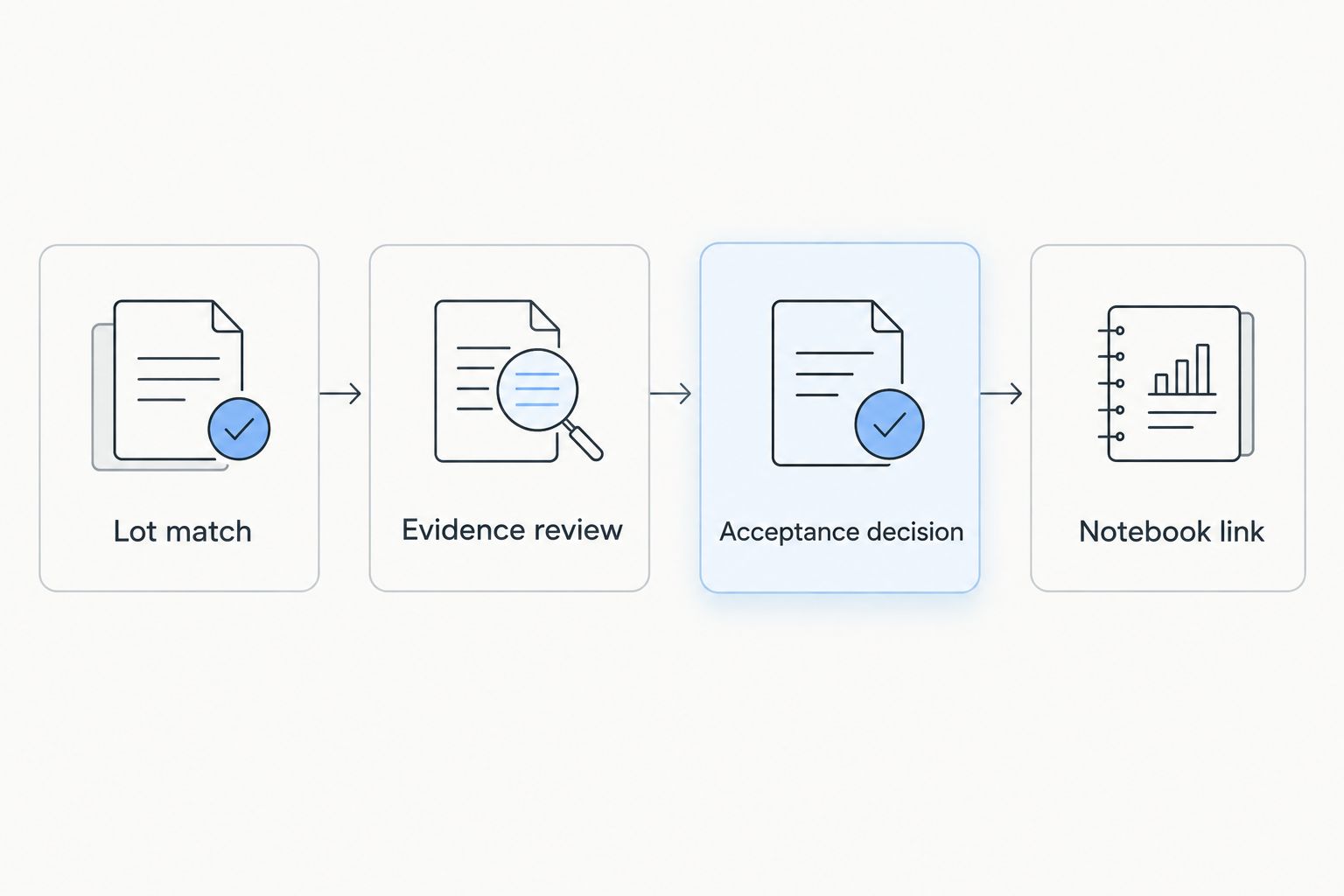
For Southwestaminos peptide research records, keep the same checkpoints across different materials. Retatrutide and Tirzepatide require their own lot-specific evidence and research-defined criteria; a record for either material cannot stand in for the other.
Re-review whenever a COA is updated
A replacement certificate creates a second workflow: reassess the evidence without erasing the earlier decision. This matters even when the supplier describes the change as administrative.
- Save the replacement under Revised COA, preserving Original COA. Record when you received the replacement separately from the report's own date.
- Compare the lot identifier, peptide name, methods, reported results, report identifier, and explanatory notes. Record the differences in Revision summary.
- Set Re-review status to Pending whenever a change affects an acceptance criterion or leaves its effect unresolved. Follow laboratory procedures for any restriction on further research use.
- Have the authorized reviewer assess affected notebook entries and document the outcome under Impact assessment. A changed report does not automatically invalidate every earlier observation, but its relevance requires review.
- Record a new decision and link it to the previous one. Preserve the sequence so readers can reconstruct what evidence was available at each decision point.
Expected result: A reader can distinguish the original assessment from the revised assessment and identify any affected research records.
In a 2026 review, preserve source dates exactly as supplied. Never relabel an older analytical report with the current year to make the evidence appear newer.
Troubleshooting
The container and COA show different lot identifiers
Stop the acceptance decision and retain photographs or transcriptions of both identifiers. Request a documented explanation connecting the records; similarity in peptide name is insufficient. Record the resolution and its source before changing Document match.
The certificate reports purity but no usable identity evidence
Mark the identity requirement Pending or Not assessed, according to your template. Request the evidence your protocol requires. Do not infer peptide identity from a high chromatographic purity result.
The purity result does not establish peptide content
Keep the reported purity result unchanged and separately assess whether the research protocol requires content information. Chromatographic peak-area percentage is not automatically a mass fraction. Do not calculate peptide content from that percentage unless the validated analytical basis supports it.
The analytical attachment is unreadable or incomplete
Retain the received file, record the problem, and request a legible report or the relevant supporting data. A screenshot that omits sample identification or method details cannot supply those missing details. Leave affected criteria unresolved until adequate evidence is available.
The notebook points to a file that has disappeared
Store a controlled copy in the laboratory's approved document location and update the record reference without deleting its history. Test access using the permissions expected for reviewers. A supplier download location alone is not a durable laboratory record.
Customize your workflow
Start with a manual template that your laboratory can review consistently. Automate routing only after the acceptance rules are explicit. Automatically creating a record or sending a review reminder is different from automatically accepting analytical evidence.
If your system supports conditional rules, route unresolved lot matches to document review and missing analytical requirements to scientific review. Keep extracted values visibly tied to their source files, and require verification before using them in a decision.
Connect this record to your cold-chain receiving workflow. Receipt-condition records and COA records answer different questions; neither replaces the other.
For your 2026 template review, check whether renamed fields, changed permissions, or revised laboratory criteria have broken the evidence trail. Keep supplier-specific details separate from the core template so the process remains consistent across purchases.
FAQ
What is a peptide COA verification workflow?
A peptide COA verification workflow connects a received lot to its certificate, analytical evidence, acceptance criteria, and research notebook decision. It separates document matching from scientific review rather than treating an attachment as acceptance.
Does a high purity percentage prove peptide identity?
No. A chromatographic purity percentage alone does not establish peptide identity. Review identity evidence using the method and interpretation required by your research protocol.
Can I use a product-page COA for my received lot?
Only when the document is demonstrably connected to your received lot. A matching product name alone is insufficient; resolve the lot connection before accepting the certificate as lot-specific evidence.
What should I check for Retatrutide or Tirzepatide research documentation?
Check the received lot, certificate identifiers, reported methods, and evidence against the laboratory's predefined research requirements. Keep Retatrutide and Tirzepatide records separate and do not infer either material's identity from another lot's documentation.
Is chromatographic purity the same as peptide content?
No. Chromatographic purity and peptide content describe different analytical properties. Preserve the reported basis and request separate content evidence when your research protocol requires it.
What should I do when a supplier replaces a COA?
Preserve both versions and document the differences before reassessing the acceptance decision. An authorized reviewer should evaluate any effect on linked research records and record the outcome.
Can software automatically approve a peptide COA?
File extraction or document matching alone does not establish analytical acceptance. Use software to organize evidence and route review, with any automated decision governed by laboratory-approved criteria and controls.
One last thing
A complete evidence trail can end in a decision not to accept a lot. That is a useful workflow outcome: the notebook documents why the material did not meet the laboratory's defined requirements instead of disguising uncertainty as verification.
For Southwestaminos research purchases, keep the decision next to the evidence—not only in an email thread. The next researcher should find the reason, not just the certificate.