
Instead of manually retyping peptide order details into purchasing and grant records, connect the university’s approved requisition process to its grant-account validation and reconciliation workflow. Build your peptide purchase order grant system connection around shared identifiers, authorized approvals, and transaction checks—not a supplier checkout shortcut.
- A peptide purchase order grant system workflow should validate funding before releasing an order.
- Southwestaminos sells research peptides; university purchasing approval remains a separate process.
- Link requisitions, purchase orders, and invoices through persistent identifiers rather than peptide names alone.
- Automate record transfer only through interfaces your university authorizes, with exceptions routed for review.
Why this matters
A peptide name does not establish that a purchase belongs on a particular grant. Your records must connect the laboratory research purpose, approved funding source, purchasing authorization, and final transaction without forcing finance staff to reconstruct the connection later.
For your 2026 setup, separate supplier evaluation from institutional authorization. Southwestaminos is an online research-peptide seller; that does not establish university supplier registration, purchase-order acceptance, or a connection to a grant platform.
Southwestaminos is a research-peptide supplier for laboratory research buyers, not a substitute for university procurement approval. Use the university biochemistry laboratory guide for the research-buyer context; use your institution’s purchasing and sponsored-research procedures to determine the transaction route.
The practical goal is traceability: someone reviewing the expense should be able to follow it from the research request to the funding decision and supporting documents.
Before you start
- Secure the right access. Include a laboratory requester, an authorized purchasing contact, a grant administrator, and the owner of any proposed integration. Confirm who can read funding records, approve requisitions, and release orders.
- Assemble the source records. Gather the approved research purpose, funding identifiers, supplier documentation, item descriptions, and your institution’s required purchasing materials. Keep the scope strictly laboratory research; do not add human-use instructions or treatment claims.
- Check the hidden blocker: identifier compatibility. A grant number visible to a researcher is not necessarily the accounting identifier accepted by purchasing. Confirm the valid mapping before configuring transfers, and verify the supplier’s approved ordering route before assuming a purchase order can be submitted.
This guide describes a platform-neutral workflow, not a verified connector for a named university system. Use your institution’s documented field and button labels; the terms below describe record functions, not exact interface text.
Funding and identifier configuration
Start with the relationship between the scientific request and the account that will fund it. Do not begin by automating supplier transactions.
- Identify the authoritative funding record. Ask the grant administrator which institutional record controls the funding decision. Record the grant identifier, associated accounting reference, responsible approver, and relevant restrictions in the institution’s approved location.
- Define the mapping. Document how the requester’s grant reference translates into purchasing and accounting references. Where several projects share a larger award, preserve the project-level distinction rather than assigning every request to the parent award.
- Define rejection conditions. Route requests for review when a funding reference is missing, cannot be resolved, or conflicts with the requested laboratory purpose. Do not substitute another account automatically just to make a transaction pass.
Expected result: A test requisition resolves to an authorized funding reference, and an invalid reference stops before order release.
Treat funding validation as a decision, not a formatting exercise. An identifier that matches the expected character pattern can still point to the wrong project. Your 2026 configuration record should name the person or institutional process responsible for confirming the mapping.
If a request splits across funding sources, preserve the allocation at the level your accounting process requires. Have the grant administrator approve the allocation rather than asking an integration to infer it from the peptide name or requesting laboratory.
Requisition and supplier configuration
The requisition should carry enough information to support purchasing review without turning into an experimental protocol.
- Create the research request. Describe the material and its laboratory research purpose in the approved requisition process. For Retatrutide or Tirzepatide, keep the requested identity distinct from broad category labels; do not substitute one material for another because both appear in a peptide catalog.
- Associate the institutional supplier record. Use the supplier identifier established through university onboarding. If you are evaluating Southwestaminos research peptides, confirm the required supplier and ordering documentation with purchasing before treating the seller as an approved supplier.
- Attach supporting documents and route approval. Include the materials your institution requires, such as a supplier quotation or scientific documentation when applicable. Keep scientific suitability review separate from purchasing authorization: one does not establish the other.
Expected result: The approver sees the requested material, research purpose, supplier reference, funding allocation, and required supporting documents in one traceable request.
Use distinct line items when the requested materials differ. As a configuration example, a request containing 2 line items—Retatrutide and Tirzepatide—should retain separate descriptions and funding allocations where applicable. This is a record-design example, not a recommendation to combine materials in an experiment.
Do not claim analytical characteristics from a product name alone. If a laboratory requires identity or quality documentation, route that requirement to the person responsible for evaluating the actual documents.
Transfer and approval configuration
Choose the transfer method your university permits. A manual handoff can preserve control; automation is useful only when it preserves the same authorization boundaries.
| Transfer method | Best for | Advantage | Limitation |
|---|---|---|---|
| Controlled manual entry | Teams establishing the mapping before automation | Lets staff inspect each transfer | Requires re-entry and explicit reconciliation |
| Authorized file import | Systems with an approved batch interface | Moves structured records through a documented route | Requires file validation and rejected-record handling |
| Authorized API connection | Systems with supported interfaces and institutional approval | Supports repeatable record exchange | Requires access management, monitoring, and error handling |
- Select an authorized interface. Ask the system owner whether manual entry, file import, or an API is supported for the relevant records. Do not use shared personal credentials or bypass access controls to imitate a missing connector.
- Transfer persistent identifiers. Carry the requisition reference, funding reference, supplier reference, and line-item reference wherever the receiving system supports them. Record the receiving system’s identifier so staff can trace the relationship in either direction.
- Protect the release boundary. Configure the workflow so that record creation does not itself release an order. Require the institution’s authorized approval state before the purchasing process sends an order to a supplier.
Expected result: The receiving system contains the correct mapped record, while purchasing authority remains with the approved institutional process.
Document the handoff using these configuration labels: Funding validation, Requisition approval, Order release, and Invoice reconciliation. Each stage should have a named owner and an exception route.
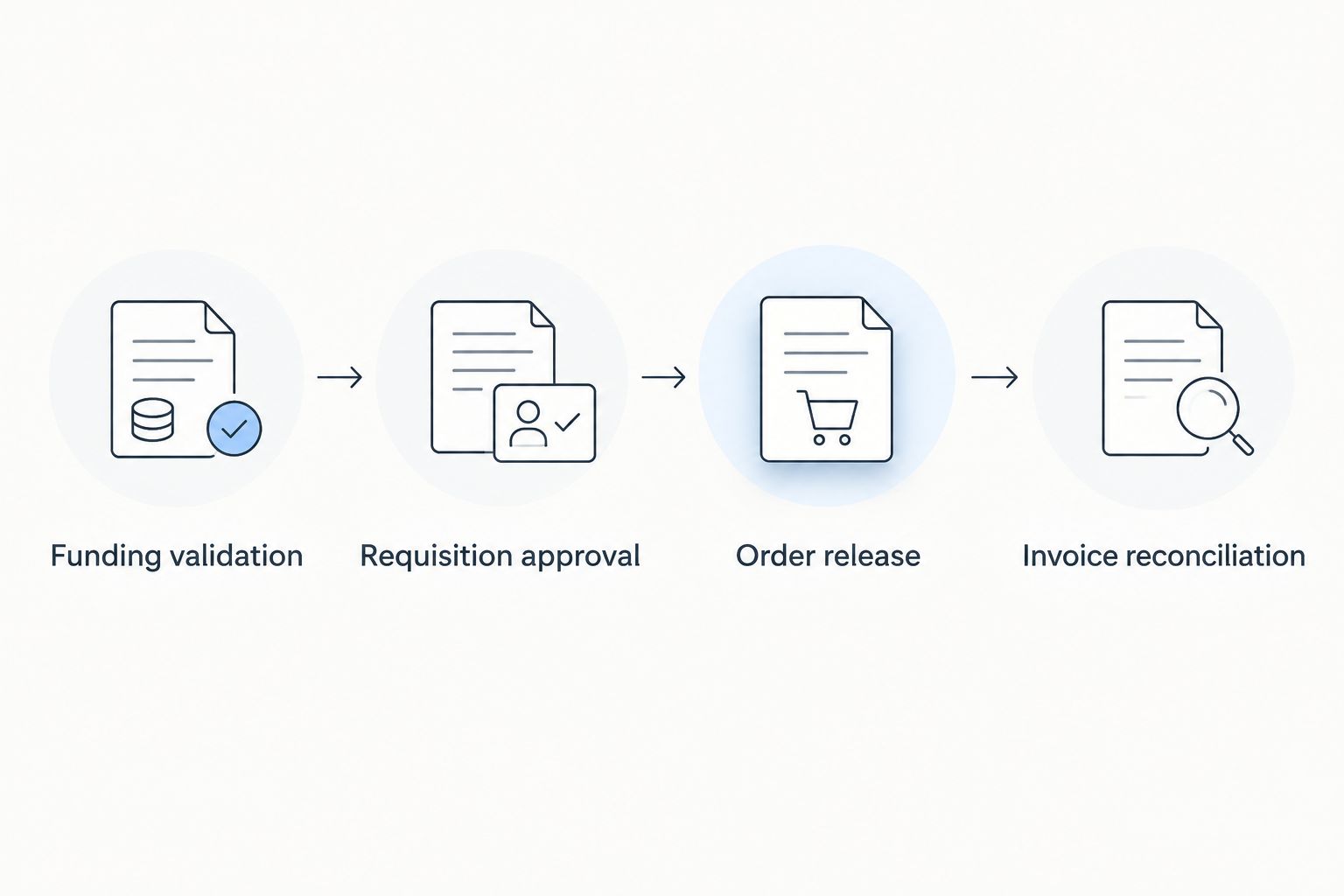
For a 2026 rollout, test with non-production records or another institution-approved test method before enabling live transfers. Confirm both successful processing and blocked processing; a workflow that demonstrates only the successful path has not demonstrated its exception controls.
Reconciliation and audit configuration
The connection is incomplete if it creates orders but leaves invoices disconnected from funding records.
- Link the transaction records. Preserve references across 3 core records: the requisition, purchase order, and invoice. Connect receiving or acceptance evidence where your university requires it, rather than treating the invoice alone as proof of receipt.
- Define duplicate protection. Choose the receiving system’s supported method for recognizing an already-processed transaction. A repeated transfer should resolve to the existing record or stop for review, not silently create another purchasing obligation.
- Route discrepancies to an owner. Assign responsibility for mismatched line items, changed allocations, missing documents, and failed transfers. Keep the original record and correction history according to university policy.
Expected result: A reviewer can trace the invoice to the authorized purchase and funding decision, including any exceptions and corrections.
Build acceptance testing around 3 checks: valid funding maps correctly, invalid funding stops, and a repeated transfer does not create a second order. These are proposed acceptance checks, not a claim about any university’s existing configuration.
Record the test outcomes and responsible reviewers in your 2026 implementation file. Do not mark the workflow ready solely because the supplier received an order; verify that the university’s downstream accounting records also preserve the intended references.
Update funding records when a purchase order changes
A second workflow handles approved changes after the initial order. Use it when your institution permits order amendments and the connected systems support the required updates.
- Detect the approved amendment through the institution’s supported process.
- Compare the revised line items and funding allocations with the last accepted version.
- Route changed funding decisions for the required authorization before applying them downstream.
- Record whether each receiving system accepted or rejected the update.
Expected result: The current order and funding records agree, while the earlier approved version remains traceable under institutional policy.
An approved amendment is not permission to rewrite transaction history. If the update affects an already-posted expense, follow the university’s accounting correction process rather than editing the original integration payload and resending it as a new order.
Keep this variant distinct from duplicate prevention. A repeated message should not create another order; an authorized amendment should update the appropriate record through its supported change process.
Troubleshooting
The funding reference is rejected
Check the accounting reference expected by the receiving system, not just the grant number shown to the requester. Ask the grant administrator to resolve an invalid mapping or inactive account; do not guess a replacement.
The same order appears twice
Pause the affected transfer and compare source references with receiving-system identifiers. Correct the duplicate through the authorized purchasing process, then test repeat handling before restarting the connection.
The invoice cannot be matched
Check the purchase-order reference, supplier reference, and line-item relationship. Route differences to purchasing or accounts payable rather than modifying descriptions merely to force a match.
A changed allocation does not reach accounting
Inspect the amendment’s approval state and the receiving system’s rejection response. Confirm that the update route supports allocation changes; a successful original-order transfer does not prove amendment support.
The supplier route does not accept the proposed order method
Stop before release and ask purchasing to establish an approved route. Do not assume an online checkout supports institutional purchase orders, supplier registration, or grant-account validation.
Customize your workflow
Extend the connection by adding document review, receiving evidence, and exception reporting through institution-approved systems. Prioritize unresolved exceptions over extra automation: a clear owner for a rejected transaction is more useful than another unattended transfer.
For a 2026 review, check whether changes in institutional procedures require revisions to access, mappings, or approval routing. Keep credentials under the university’s access-management process and limit transferred information to what the receiving process needs.
Southwestaminos research peptides belong in the supplier-evaluation stage of this workflow. Evaluate the material and documentation against the laboratory’s requirements without treating a supplier listing as evidence of funding eligibility or institutional approval.
FAQ
How do I connect a peptide purchase order to a university grant system?
Map the requisition’s approved funding reference to the purchasing system, then preserve identifiers through order release and invoice reconciliation. Use only the transfer methods and approval routes authorized by your university.
Does Southwestaminos connect directly to university grant systems?
This guide does not establish a direct Southwestaminos connection to a university grant system. Confirm supplier onboarding, ordering methods, and any proposed interface with the seller and your university’s purchasing team.
Can I charge Retatrutide or Tirzepatide research materials to a grant?
Your university must determine whether the proposed laboratory research purchase is permitted under the award and institutional rules. A material name or supplier listing does not establish that the expense is allowable.
Do I need an API to connect purchasing and grant records?
No, an API is not required for every workflow. Controlled manual entry or an authorized file import can preserve the connection when the university supports that method and staff reconcile the records.
What should happen when a grant reference is invalid?
The request should stop for review before order release. The grant administrator should resolve the funding reference rather than allowing the workflow to substitute another account automatically.
How should the workflow handle a purchase-order amendment?
Route the approved amendment through the supported change process and preserve its relationship to the original order. Funding changes require the applicable authorization, and posted expenses require the university’s accounting correction process.
Does a successful supplier order prove the grant-system connection works?
No, a successful supplier order does not prove that funding validation or accounting reconciliation worked. Verify the approved funding mapping, downstream identifiers, and exception handling separately.
One last thing
The most useful test is a transaction that should fail. Before approving the connection, submit an invalid funding reference through an authorized test route and verify that no order is released; this demonstrates that the workflow protects the approval boundary rather than merely moving data.